Inventorying your collection: build a card list in five steps
Spreadsheet or collector app, counting bulk instead of listing it card by card, storage codes and a value column: build your card list in five steps.
 Claudy· Guides & Tutorials

At some point your collection outgrows your memory: is the card in your binder the German or the English print, do you own it twice, which box is it in? A card list fixes that. Every card that deserves it gets one row with the same details, and every row tells you where the card lives. You pick a tool, decide what gets its own row, record each card unambiguously, link the list to your storage and keep track of value.
Step 1: Choose between a spreadsheet and a collector app
For a card list you can use a spreadsheet, where you set everything up yourself, or a collector app that recognises cards by scanning them.
What a spreadsheet does well
In a spreadsheet you decide every column, which helps with anything you want to record on your own terms, such as a storage code. In Google Sheets, the example in this guide, two features matter most:
- Dropdown lists keep a column consistent, because Google Sheets rejects entries that are not on the list. You will not end up with "NM", "Near Mint" and "nm" in the same column, and filtering stays clean.
- SUMIF adds up only the values that meet a condition; the last step shows how to total your value with it.
The catch: you type in every card yourself.
What a collector app does well
A collector app with a card scanner can take that typing off your hands. Two examples from the App Store:
- The TCGplayer app is free and covers several games, Pokémon among them. Its App Store description says scanning saves you from typing and from searching for the right card version. It also tracks the market price of the cards you add, offers lists and export options for your collection, and once you log in, your collection is on your phone.
- Collectr is described in the App Store as a tool for managing ungraded (raw), graded and sealed cards and tracking their value. Unlimited scanning and data exports require an in-app purchase there.
Before you scan a large pile into an app, check which features cost extra and whether an export gets your data back out if you want a copy or switch later.
So a spreadsheet suits you if you want your own columns and your data in a file of your own; an app suits you if you would rather skip the typing. The steps below use the spreadsheet, but the thinking on bulk, storage and value applies to both.
Step 2: Decide what gets its own row
Not every card needs its own row. Bulk is what collectors call low-rarity cards that appear in every set and often sell in large quantities at very low per-card prices. In Pokémon that mostly means commons, marked with a circle, and uncommons, marked with a diamond.
Look closely before you call something bulk
Start by splitting a pile by rarity. Cards that deserve their own row can turn up along the way:
- Non-holo rares with the star symbol.
- Reverse holos: well-preserved reverse holos from earlier series often fetch noticeably higher prices than their regular copies.
- Parallel set cards, which are easy to overlook.
- Miscuts and error cards, which can be worth more than you would expect.
This closer look pays off especially with older collections. Whatever is left is your bulk.
How to count bulk anyway
Record bulk not card by card but as a summary row: one row per box or per set, with the rarity and the count in the quantity column.
Count in fixed bundles. Bulk is usually priced per 100 or 1000 cards, and buy rates vary. If you count in stacks of a hundred right away, your numbers match that calculation.
Do not trust the label on the box. According to the manufacturer, BCW's 800 Count Storage Box holds about 700 standard 20 pt trading cards or about 1140 collectible gaming cards. The number on the box is not a count of what is inside.
If you plan to sell bulk later, also sort it by card type (Pokémon, Trainer, Energy) and keep one summary row per type.
Step 3: Set up the columns and record every card unambiguously
Put these column headers in the first row:
- Card name
- Set
- Set code
- Collector number
- Language
- Rarity
- Variant (for example holo, reverse holo, first edition)
- Condition
- Quantity
- Storage location
- Purchase price, current value, date checked and value source
For language, variant, condition and storage location, create a dropdown through Insert and Dropdown or through Data and Data validation. Type the values in yourself or pick a range of cells as the source; the dropdown picks up changes to that range automatically. To allow exceptions, set Advanced options to show a warning instead of rejecting the entry.
Read the set code and collector number
On modern Pokémon cards the set identifier and rarity symbol sit in the bottom left corner. Recent expansions use a three-letter set code, with the language code next to it. Here is how that looks on Charizard ex from Obsidian Flames, German print:
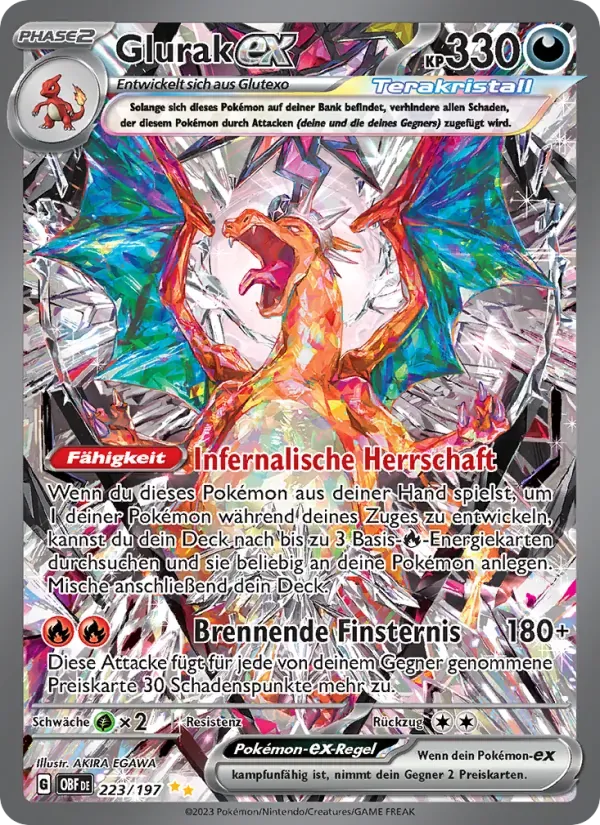
Your list gets Charizard ex as the card name, Obsidian Flames as the set, OBF as the set code and 223/197 as the collector number, exactly as printed. The number before the slash being larger than the one after it is not a mistake: secret rares, illustration rares and full arts are numbered after a set's base cards, so their number sits above the printed base card count.
Why: the collector number is the easiest way to find a Pokémon card on Cardmarket. With the set code and number in your list, you do not have to take the card out of the binder to look it up.
Keep language and variant apart
The English print of the same card carries the same set code and the same collector number. In the bottom left, though, it reads OBF EN instead of OBF DE.
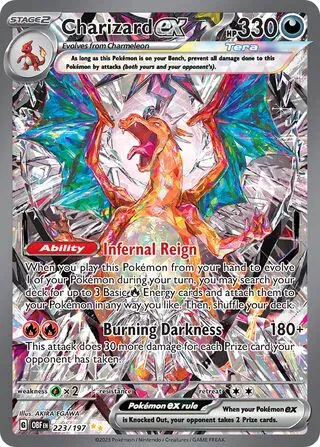
For Pokémon cards, Cardmarket separates Western languages (English, French, German, Spanish, Italian, Portuguese) from Asian languages (Japanese, Korean, Traditional and Simplified Chinese). These make good values for your language dropdown.
For the variant, tell these cases apart:
- Holo or reverse holo: holo is a rarity, where the artwork carries the holofoil. Reverse holo is not a rarity but an attribute: the holofoil sits not on the artwork but on the rest of the card. Mixing the two up is the most common mistake when listing Pokémon cards on Cardmarket, so separate them in your list from the start.
- First edition: Western cards carry a stamp reading EDITION 1 on the middle left below the artwork; Japanese cards have a black 1 in the bottom right corner.
- Reprint: some cards exist as non-holo versions from different expansions, so check the set code and number instead of assuming the main set.
Grade condition on a fixed scale
For the condition column, use the seven grades of the Cardmarket scale as dropdown values, from best to worst:
- Mint (M)
- Near Mint (NM)
- Excellent (EX)
- Good (GD)
- Light Played (LP)
- Played (PL)
- Poor (PO)
Grading condition is not an exact science. There is one clear line, though: on the Cardmarket scale, a card with scratches on its surface is Good at best. If you are torn between two grades, enter the lower one. How to recognise each grade is covered in our guide Card conditions explained.
Step 4: Link every row to a storage location
A list only does half its job if it cannot tell you where a card is. You need two things for that: a sorting system that decides where cards physically go, and a storage code in every row.
Pick a sorting system
Possible ways to sort Pokémon cards:
- By set and number: split by expansion first, then by collector number within it.
- By Pokédex: in National Pokédex order.
- By type: Grass, Fire, Water, Psychic and so on.
- By card type: one binder each for Pokémon, Trainer and Energy.
- By artist: a binder of its own for one illustrator's work.
You can keep Japanese cards separate. If you collect a master set, meaning every variant of a set including reverse holos and secret rares, sorting by set and number fits your list well, because the binder order then follows the collector numbers.
Also split the collection by value: top cards go double-sleeved (in two protective sleeves) into toploaders, rigid plastic holders, or magnetic cases, kept dry and dark. Mid-tier cards sit by set in binders or card boxes, bulk in dedicated, space-saving bulk boxes. More in our guide Storing cards properly.
Assign storage codes
Give every container a short, unique name and enter it in the storage column. A simple scheme for binders has three parts: the binder's abbreviation and running number, the page, and the pocket on that page. For boxes, the box name is enough, plus the section behind it if you use dividers. BCW's 800 Count Storage Box, for example, works with the manufacturer's horizontal card dividers.
Bulk summary rows get a location too. When you move a card, update its row straight away, or the list goes stale with the next reshuffle.
Step 5: Track value and back up the list
For value you use the four columns you already created: purchase price, current value, date checked and value source. Record at least the set, purchase price and current value for each card.
Why a date: values do not stand still. A PokéZentrum article from June 2026 reports that bulk cards from the Sun & Moon and Sword & Shield series had risen noticeably in value over the preceding months, with Pikachu, Mew and Gengar among the sought-after Pokémon. Without a date you cannot tell later how current a value is; the source shows where to look next time.
Because variants can differ in value, as the reverse holos in your bulk show, each variant gets its own row with its own value. Enter the value of the whole row in the value column, that is the single-card value times the quantity.
You can total a container with SUMIF (SUMMEWENN in the German interface). If, as in the column list above, the storage location is in column J and the current value in column L, =SUMIF(J:J, "Binder A", L:L) returns the value of every card in Binder A. If you use one of the two collector apps, it keeps track of value for you.
If you also want to use the list as evidence for an insurer, everything else is in our guide Insuring your collection.
Back up the list
Save a copy to a USB stick or a removable hard drive, keep it physically separate from your computer and check once that you can restore it. How often you back up depends on how often you use your computer and which data you need at all times; for a card list, after every larger addition is a sensible rhythm.
Take-away checklist
- Tool chosen, extra costs and export checked
- Standout cards pulled, bulk recorded as summary rows with counts
- Columns and dropdowns set up, every copy recorded
- Every row linked to a storage code
- Value noted with date and source, backup stored separately and restore tested
Frequently asked questions
How do I find a card without a readable collector number?
On Cardmarket you can search for one of the card's attack names. Add the number to your list once you have found it.
Sources
Show sources
- App Store: TCGplayer
- App Store: Collectr - TCG Collector App
- Google Docs Editors Help: Drop-down-Listen in einzelnen Zellen erstellen
- Google Docs Editors Help: SUMMEWENN
- Card Codex: What To Do With Pokémon Card Bulk: From Drab to Fab!
- Card Codex: Here Are The Best Ways To Sort & Organize Your Pokémon Cards
- PokéZentrum: Diese Bulk-Pokémon-Karten sind überraschend wertvoll!
- BCW: 800 Count Storage Box
- Cardmarket: Finding and Listing Pokémon Cards
- Cardmarket: Card Condition
- Dexerto: Pokemon TCG card symbols explained
- BSI: Datensicherung – wie geht das?
Card images: InSleeve catalog
Research & data: InSleeve team, AI-assisted, editorially reviewed.
Comments are coming later.